Asset management

Every machine. Every component. One data base.

You know the situation: master data in the ERP or CRM, serial numbers in spreadsheets, components in the designer's head. intuAid brings that together, per device, available with a QR code scan.

From everyday work

Three situations you know from everyday master-data work.

  1. 01

    Four systems, no clear picture.

    The ERP holds one thing, the maintenance spreadsheet the next, the service report a third. Nobody knows what is really installed in the device.

  2. 02

    Duplicate maintenance everywhere.

    A part is swapped out and you update it in three places. Or you do not, because nobody has the time.

  3. 03

    Nobody knows the history.

    What was replaced in 2021? Which variant is running at the customer? Whoever knows is about to retire.

intuAid asset management is a digital asset file that brings together the master data, components, configuration, documents and history of every machine in one place and makes it available via QR scan.

What does asset management give you?

It replaces scattered systems with a shared data base for each device. Service management, technicians and sales can see at any time what is really installed and what history sits behind it. That saves follow-up questions, avoids duplicate maintenance and keeps the knowledge about your equipment independent of individual people.

How it all fits together.

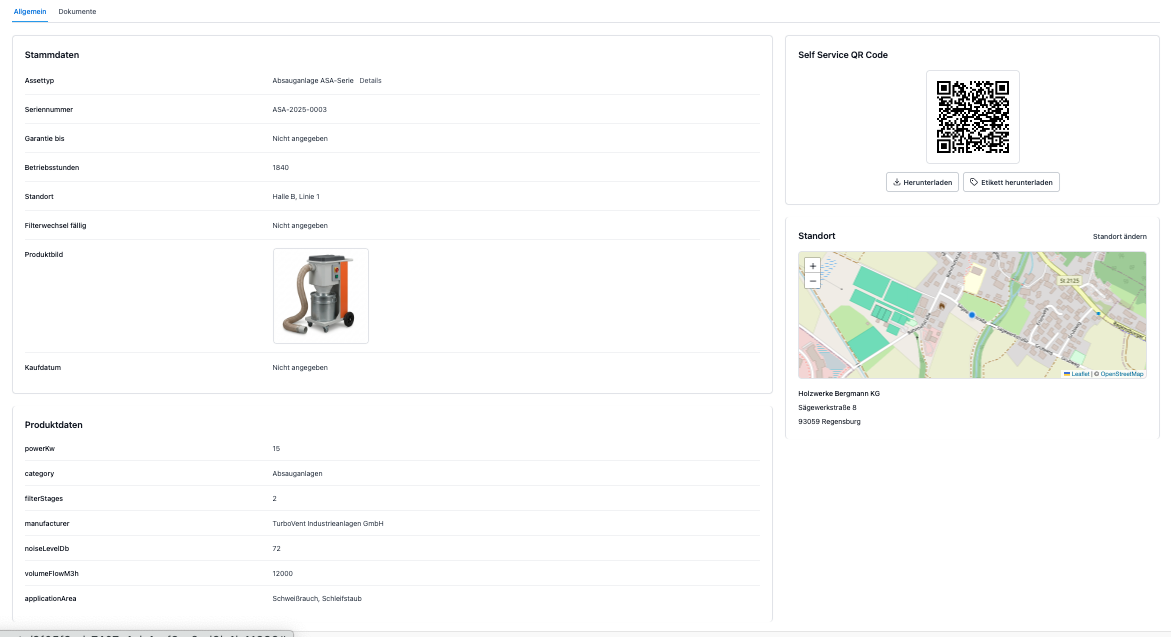
Digital asset file of an extraction system with master data, product data, self-service QR code and location
One extraction system, one file: master data, product data, QR code and location in a single view.

One file per device.

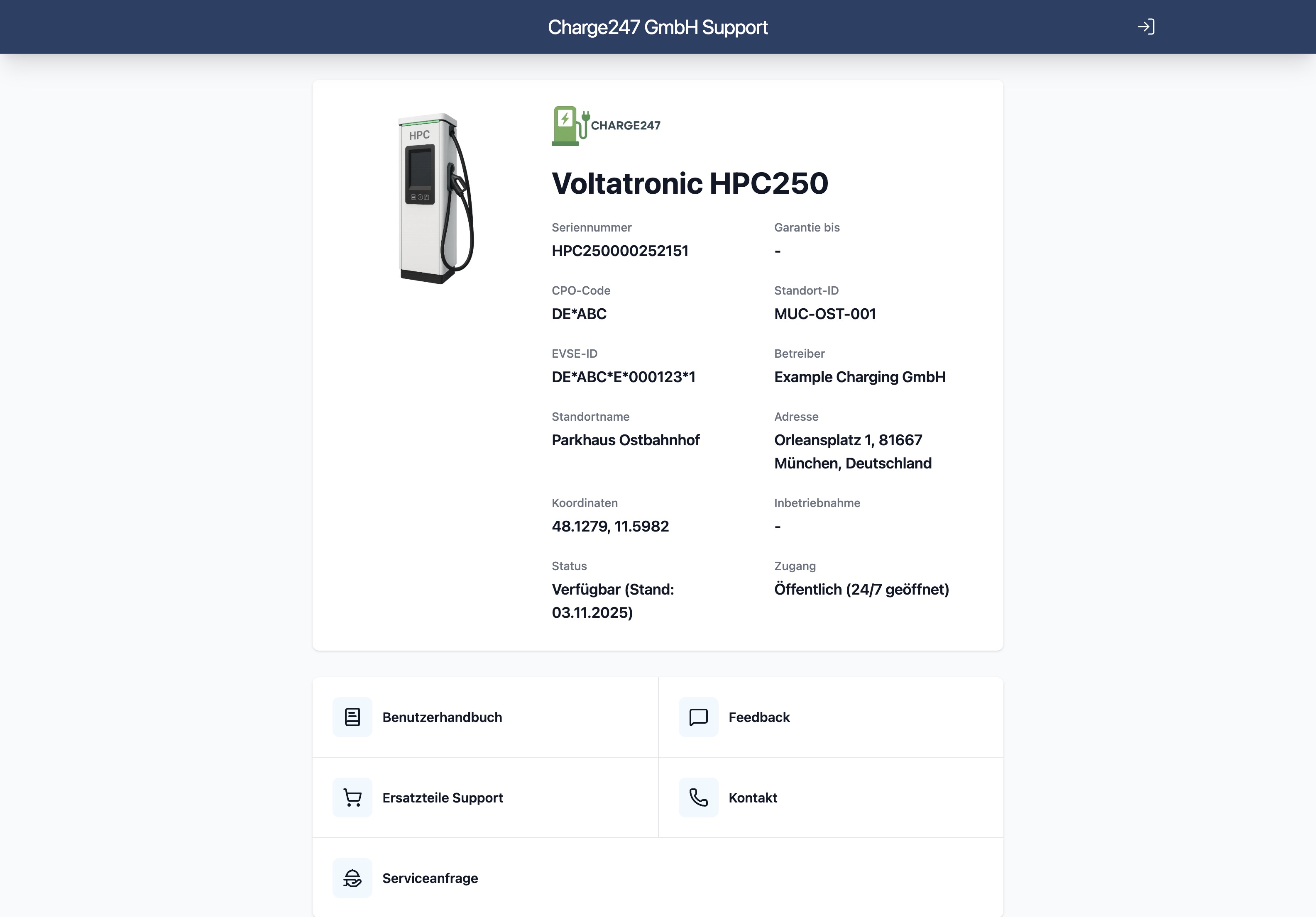
Every machine has its own digital file with master data, components, configuration, documents and history. Reachable via QR scan, with no login for end users.

  • Serial number, model, variant
  • Installed components and assemblies
  • Maintenance history and service reports
  • Location and responsibilities

Hierarchies that map your installation.

Installation → machine → assembly → component. You model your structure, intuAid maintains it. Reports can be evaluated at every level.

  • Multi-level asset hierarchies
  • Inheritance of documents and permissions
  • Site-specific and customer-specific views
  • Reports at every level

QR and NFC tags on the device.

Put the tag on, scan it, and there is the file. No searching, no questions about the model, no phone call. It also works without internet once the device has been loaded once.

  • Generate print-ready QR and NFC markers
  • Direct link into the asset file
  • Offline-capable after first access
  • Works on any smartphone

In sync with your ERP.

Master data stays authoritative in the ERP, intuAid mirrors it. No duplicate maintenance, no sync drama. Updates take effect in both directions if that is what you want.

  • Bidirectional sync with your systems
  • Configurable which system is authoritative
  • Audit log of every change
  • REST-API for custom ERPs

Variants and configurations.

One machine, ten variants? No problem. You maintain the model once, each variant inherits the base and adds only what is special.

  • Model master data as a template
  • Variant-specific components
  • Configuration snapshots per delivery
  • Compare two configurations in one click

Who benefits

Three roles, one benefit.

Service management

Sees every installation with its current configuration. Plans maintenance from real data, not from guesswork.

Field technician

Scans, sees the status and the history. Goes into the job with the right knowledge.

Sales and aftersales

Knows what is installed at the customer. Offers wear parts and upgrades that fit exactly.

Frequently asked questions

Try intuAid on your own machines.

Create an account and bring your first machine online today. If you would rather see intuAid in action first: in the demo we scan the QR code on one of your machines live, with no pitch and no slide deck.

Free forever for up to 3 machines. No credit card required.

Screenshot of the intuAid app showing the device landing page after scanning the QR code